11 min read
CleanMyMac Alternatives: Free and No-Subscription Options (and Whether You Need One)
Is CleanMyMac worth $39.95 a year? Free, open-source and one-time-purchase alternatives for each of its modules, plus the macOS tools that already do some.
- Comparison
- Apps
- Buying guide
CleanMyMac is a well-made app with a recurring bill. At the time of writing (October 2026), one Mac costs $39.95 a year, and once the 7-day trial ends the app will scan but not clean. If you're looking at a renewal notice, the useful question isn't "what's better than CleanMyMac?" but "which of its jobs do I actually need, and what's the cheapest good tool for each?" This guide maps every CleanMyMac module to the macOS feature that already does it, a free or open-source tool, and a one-time purchase. One disclosure: we make Disk Clean AI, which is one of the options below.
The short version
- CleanMyMac isn't unsafe; it's a subscription. One Mac costs $39.95 a year, $9.95 a month, or $119.95 once (and the one-time licence only covers the current major version).
- macOS already does several of its jobs: malware protection (XProtect), login items, app updates, duplicate photos and a basic storage breakdown.
- Best free replacements: GrandPerspective or OmniDiskSweeper for Space Lens, AppCleaner for the uninstaller, OnyX for maintenance, and the open-source Mole CLI if you're comfortable in Terminal.
- Best one-time purchases: DaisyDisk ($9.99, disk map only), the Mole app ($19, 2 Macs), Sensei ($59, 3 Macs) and Disk Clean AI ($19 launch price, 3 Macs, 7-day free trial).
- If you clean up once or twice a year, you may need nothing. The manual steps in our free up space guide take an afternoon.
What CleanMyMac costs and what it does
MacPaw relaunched the app in October 2024 as plain "CleanMyMac", dropping the X. The current version needs macOS 11 or later. MacPaw says CleanMyMac X's last supported macOS is Tahoe 26, so if you've moved to macOS 27 Golden Gate with an old X licence, you're choosing between upgrading and replacing it anyway.
Price at the time of writing (October 2026)
| Plan, 1 Mac | Price | Major-version upgrades |
|---|---|---|
| Annual | $39.95 a year ($3.33 a month) | Included |
| Monthly | $9.95 a month | Included |
| One-time | $119.95 | Not included; upgrades are discounted |
Plans for 2 and 5 Macs cost less per Mac. The figures come from MacPaw's own pricing summary and store, which shows local currency, so you may see a different number. MacPaw's purchase options page explains the upgrade terms. CleanMyMac is also sold on the Mac App Store (with fewer system-level features) and included in a Setapp subscription.
There's no permanent free tier. The trial unlocks everything for 7 days. After that, MacPaw's own review page says you can still scan, but cleanup, optimisation and duplicate deletion need a plan.
The modules
- Smart Care: one scan that combines the modules below.
- Cleanup: caches, logs, system junk and Mail attachments.
- Protection: malware scanning with MacPaw's Moonlock engine, plus privacy and app-permission tools.
- Performance: login items, background items and maintenance tasks.
- Applications: an uninstaller that removes leftovers, plus an updater.
- My Clutter: large files, duplicates, similar images and old downloads.
- Space Lens: an interactive map of your disk.
- Cloud Cleanup: iCloud Drive, Google Drive, Dropbox and OneDrive.
Is CleanMyMac worth it?
It depends on how often you'd open it. CleanMyMac is notarized by Apple, its cleanup is reviewable before anything goes, and MacPaw has sold it for more than 17 years. Our Mac cleaner roundup covers safety and how to spot the bad apps in this category, so we won't repeat that here. The objection to CleanMyMac is cost, not trust.
It's probably worth it if you'd use four or more modules regularly, look after several Macs, already pay for Setapp (which includes it), or simply prefer one polished app to five small ones. It's probably not if you clean up once or twice a year, mostly need one job done (finding what's big, removing apps properly), or want one subscription fewer.
The one-time licence ($119.95) costs about the same as three years of the annual plan, and it stops at the current major version: the next one is a discounted upgrade, not a free one.
Replace it module by module
Here's each module next to what macOS already gives you, a free tool and a one-time purchase.
| CleanMyMac module | Built into macOS | Free or open source | One-time purchase |
|---|---|---|---|
| Cleanup (caches, logs, junk) | Storage recommendations; clearing ~/Library/Caches by hand | Mole CLI, OnyX | Mole app, Sensei, Disk Clean AI |
| Space Lens (disk map) | Storage → Documents ⓘ file browser (basic) | GrandPerspective, OmniDiskSweeper, ncdu | DaisyDisk |
| Uninstaller | Drag to Trash; Storage → Applications ⓘ | AppCleaner, Pearcleaner | Mole app, Sensei, Disk Clean AI |
| Updater | App Store → Updates; System Settings → General → Software Update | Homebrew (brew upgrade), Latest | Mole app |
| Protection (malware) | XProtect, Gatekeeper and notarization, always on | Malwarebytes Free (on-demand scans), KnockKnock | n/a |
| Performance (login items, maintenance) | System Settings → General → Login Items & Extensions | OnyX, KnockKnock | Mole app |
| Duplicates and similar photos | Photos → Utilities → Duplicates (Photos library only) | Czkawka / Krokiet | Disk Clean AI |
| Large files and old downloads | Finder search with a File Size rule | GrandPerspective | DaisyDisk, Disk Clean AI |
| Cloud Cleanup | System Settings → your name → iCloud | Your provider's own storage page | DaisyDisk (Dropbox, Google Drive, OneDrive, Box) |
Protection. Every Mac already runs Apple's malware defences: Gatekeeper and notarization stop unverified apps launching, and XProtect blocks known malware and removes infections, and macOS checks for new signatures daily, separately from system updates. MacPaw itself says CleanMyMac's Protection doesn't replace dedicated antivirus. For a second opinion, Malwarebytes Free scans and removes on demand but has no real-time protection. Objective-See's free, open-source KnockKnock lists everything set to launch automatically.
Duplicates. Photos finds duplicate pictures by itself: open Utilities → Duplicates in the sidebar and merge them (Apple's steps). Merged extras sit in Recently Deleted for 30 days. For files outside Photos, see our duplicates guide. Before you delete copies, know that on APFS a Finder duplicate is often a clone that shares its blocks with the original, so removing it frees nothing.
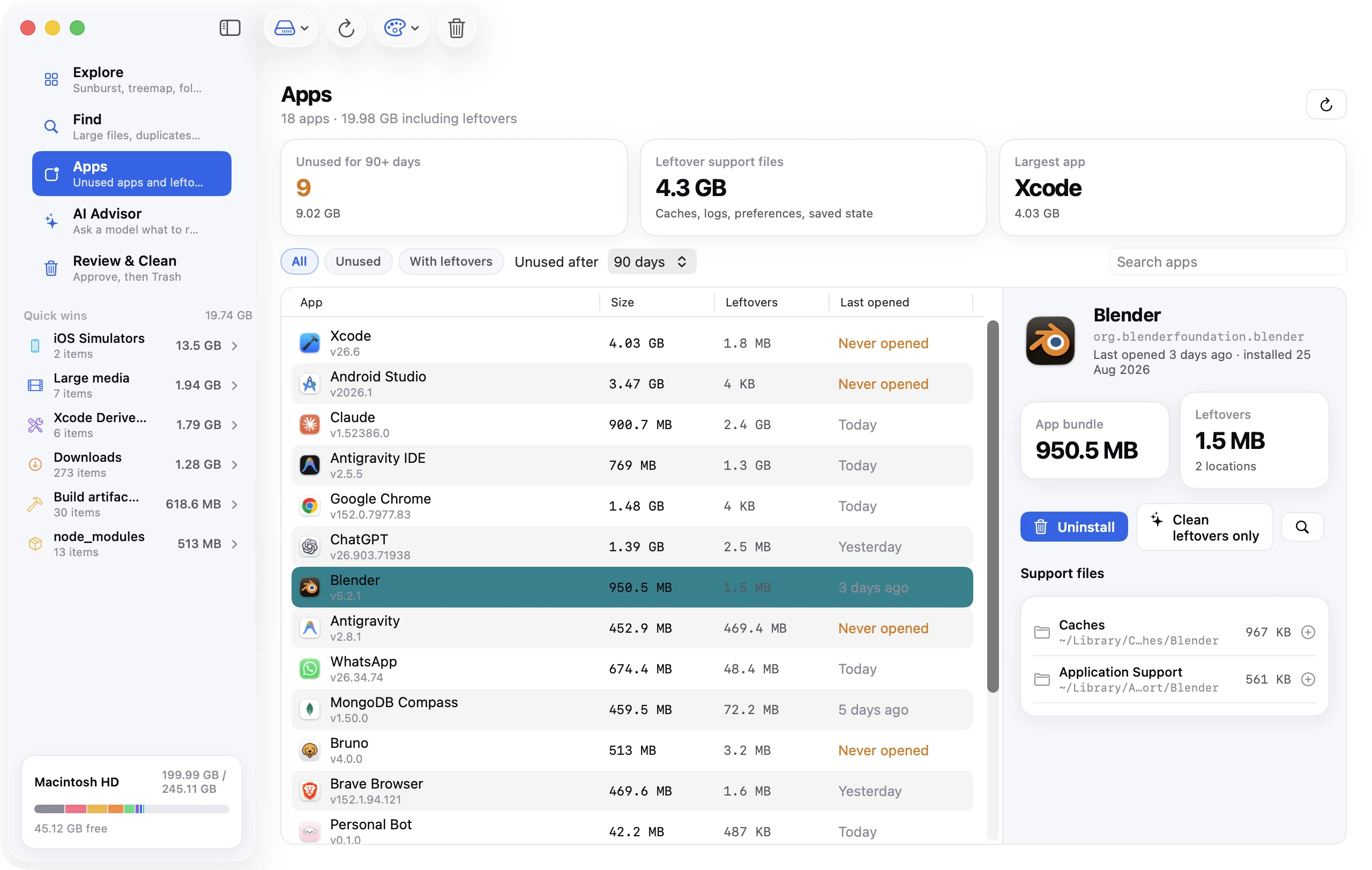
Uninstaller. Dragging an app to the Trash leaves its support files in ~/Library. Usually that's a few megabytes, but sometimes it's gigabytes. Our uninstall guide shows where to look by hand.
Free alternatives
GrandPerspective
A treemap of any folder or disk, with every file drawn as a rectangle sized by bytes. Version 3.8.1 came out on 13 September 2026. It needs macOS 14 or later and runs natively on Apple silicon. It's open source (GPL), free from SourceForge or $2.99 on the App Store for the same app. Catch: it shows you what's big, not what's safe to delete.
OmniDiskSweeper
The Omni Group's free size-sorted column browser. Version 1.16 (September 2025) added Full Disk Access prompts and explanations, and its Trash button moves files to the Trash rather than deleting them. Catch: Omni's release notes list support for macOS 11 through 26, so Golden Gate isn't officially on the list yet.
AppCleaner
Drop an app on the window and AppCleaner finds its preferences, caches and support files for removal. It's free and donation-supported. Version 3.7 needs macOS 15 or later. Catch: it only handles uninstalling, and you still decide which matched files really belong to the app.
Pearcleaner
An open-source uninstaller with orphaned-file search, a Homebrew manager and a Finder extension (brew install --cask pearcleaner). Catch: the README lists support through macOS Tahoe 26. The developer has marked the project "On Hold", with no release since 5.4.3 in November 2025.
OnyX
OnyX is a free maintenance utility that runs cleaning and maintenance tasks, clears caches, rebuilds indexes and exposes hidden settings. It's built separately for each macOS release, and OnyX 5.1.1 for Golden Gate shipped on 11 October 2026. Catch: it's a power tool. Only run tasks you understand, and only use the version that matches your macOS.
Mole (command line)
Mole is an open-source (GPL-3.0) Terminal tool with about 73,000 GitHub stars. It needs macOS 12 or later. Install it with Homebrew and preview before you let it delete anything:
brew install mole
mo clean --dry-run    # preview caches, logs and app leftovers
mo analyze            # interactive disk explorer
mo uninstall          # remove an app and its related files
Catch: mo clean deletes permanently rather than to the Trash, and it empties your Trash by default, so always run the --dry-run preview first. Mole's README also warns that molemac.com, moleapp.net and molefit.com are not Mole.
One-time-purchase alternatives
DaisyDisk
DaisyDisk is a long-running, polished disk map with clickable rings you drill into. It costs $9.99 once and the licence covers up to 5 personal Macs. Version 4.34.2 shipped in July 2026. It runs on macOS 10.13 or later and supports Apple silicon. It can scan as administrator, list local snapshots and scan Dropbox, Google Drive, OneDrive and Box. Catch: it's an analyzer, not a cleaner. Deletions are permanent rather than going to the Trash, with a 5-second window to cancel. The admin scan isn't in the App Store edition. Our disk analyzer comparison covers it in depth.
Mole for Mac
A separate, closed-source app from the Mole developer at mole.fit. It covers cleaning, app updates and uninstalls, maintenance, a treemap and live system status. It costs $19 once for 2 Macs and needs macOS 14 or later. Scanning is free, and each paid tool works twice before you buy. Catch: it's a separate codebase from the CLI, so the CLI's open-source licence doesn't extend to it.
Sensei
Sensei from Cindori combines a cleaner, uninstaller and disk scanner with hardware tools: battery health, drive S.M.A.R.T. reports, temperatures and a menu-bar monitor. It costs $59 once or $29 a year, for up to 3 Macs. Catch: a lot of what you pay for is monitoring rather than cleanup, which is good value only if you want those tools.
Disk Clean AI
Ours. It's a one-time purchase covering 3 Macs, with a 7-day free trial first. The full details, including what it doesn't do, are in the section below.
What you don't need
Whichever way you go, skip these:
- RAM cleaners. macOS deliberately fills spare memory with cache, and "freeing" it just makes apps reload. Even CleanMyMac no longer offers Free Up RAM on Apple silicon Macs. If you're seeing memory warnings, the fix is in our guide to the out of application memory error.
- One-click "speed boosters". Disk space affects speed only when the disk is nearly full.
- Scheduled cache wipes. Caches rebuild, so clearing them weekly mostly makes apps slower until they do. Our cache guide explains when clearing them helps.
- Bundled antivirus you didn't choose. XProtect is already running. If you want more, choose a dedicated security tool on its own merits.
Where Disk Clean AI fits
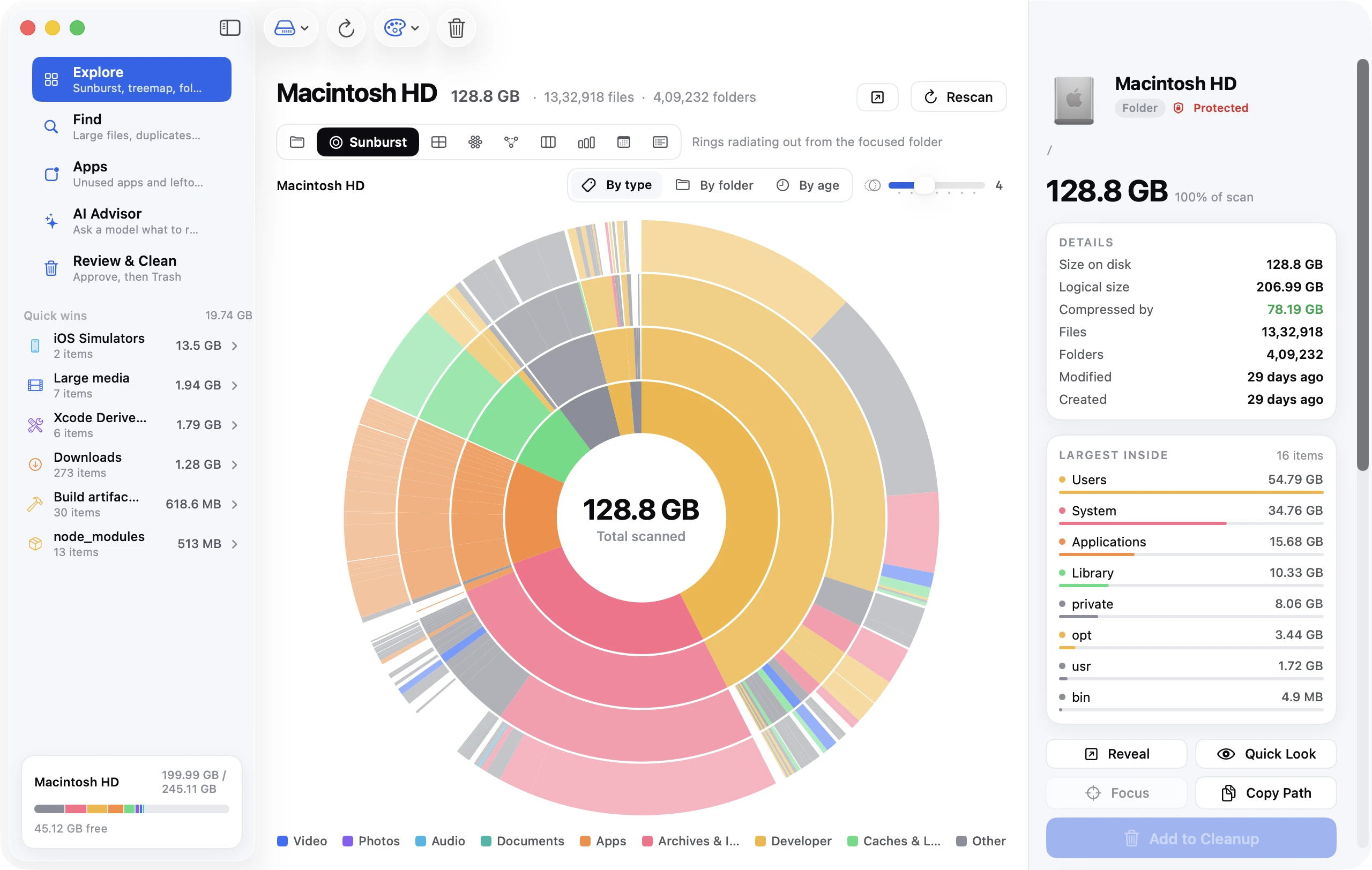
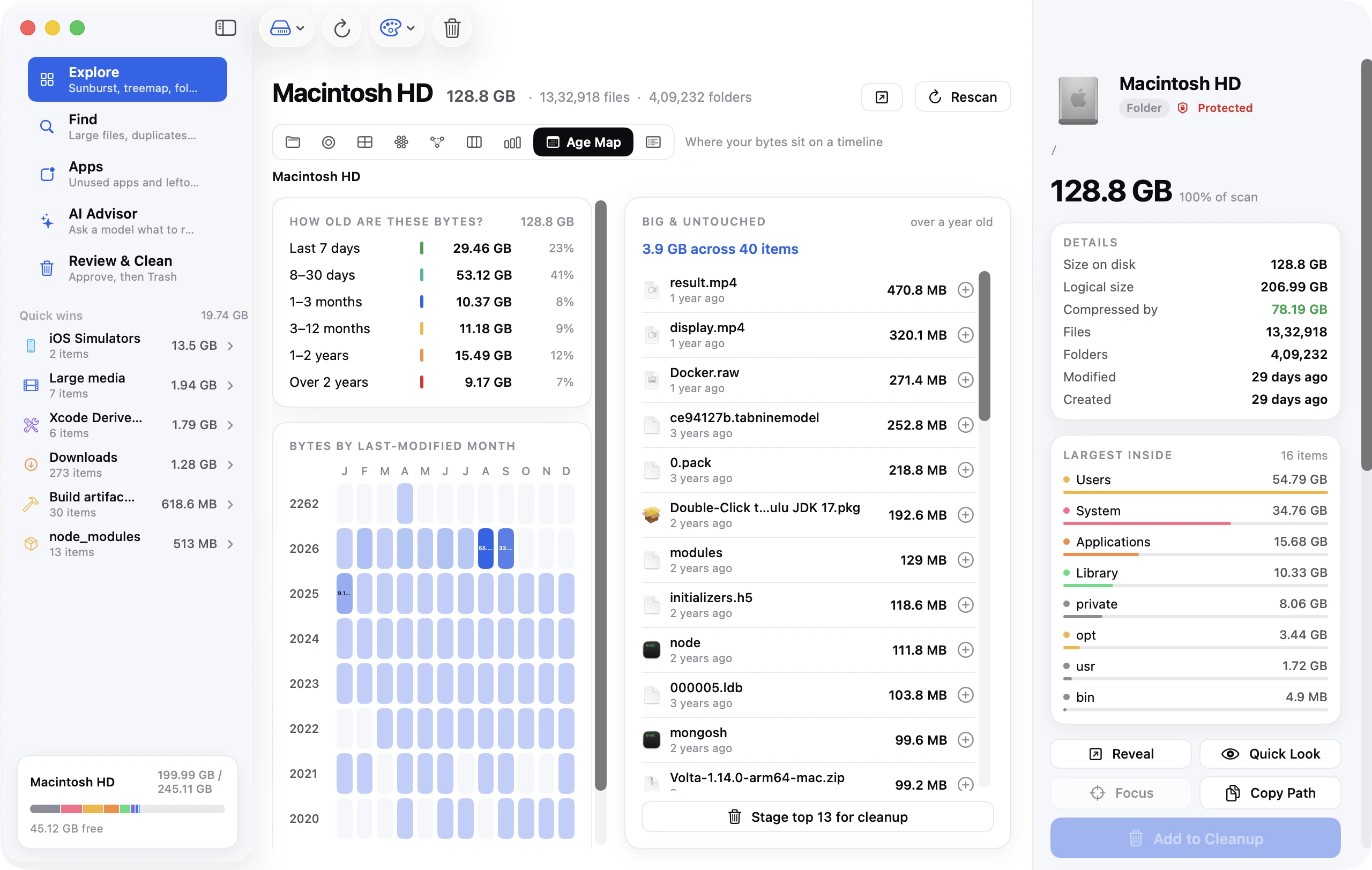
Disk Clean AI is our app, so weigh this accordingly. It scans your startup disk, home folder or any folder, and shows it in nine Explore views, including Sunburst, Treemap and Age Map. Quick Wins groups caches and logs, Downloads, Trash, large media and developer clutter like node_modules and Xcode DerivedData. Find Large Files and Find Downloads track down big and stale files, and the AI Tools screen shows and clears what AI tools such as Claude Code, Ollama and LM Studio leave behind. Everything you approve goes to the Trash with one-click Undo, and protected locations like your keychains, Mail and Photos libraries can never be selected.
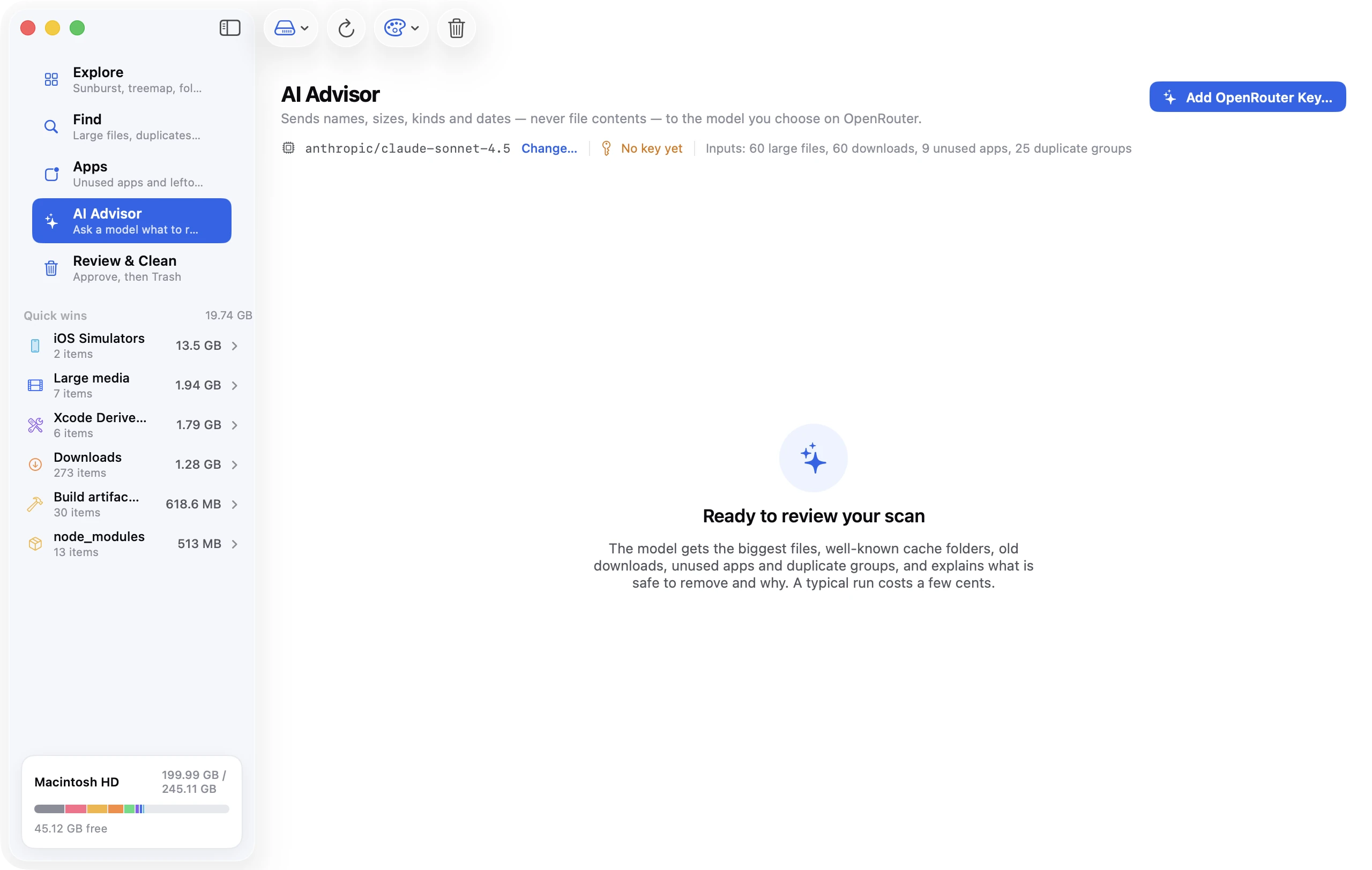
It also has duplicate and similar-photo finders, an app uninstaller that finds leftover files, System Tools with a menu-bar monitor, and an optional AI Advisor. The Advisor sends only file metadata, never contents, to a model you choose through your own OpenRouter key.
Pricing: a 7-day free trial with every feature, counted from first launch, with no account or card. After that, a license is a one-time payment: $19 at launch (usually $39), for up to 3 Macs, with no subscription and no account. When the trial ends, until you enter a key, you can't start new scans or add to Review & Clean, but you can still clean, export or copy the list you'd built, and nothing on your disk is touched. Details are on the pricing page.
What it doesn't replace: there's no malware scanner, app updater or cloud-drive cleanup. Use XProtect, the App Store and your cloud provider for those. It needs macOS 14 or later.
FAQ
Is CleanMyMac worth it?
It's worth it if you'd use several of its modules regularly and don't mind paying $39.95 a year for one Mac (at the time of writing). If you clean up occasionally, or only need a disk map or an uninstaller, free tools and one-time purchases cover the same jobs for less.
Is there a free version of CleanMyMac?
Not a useful one. The download includes a 7-day trial with every feature. After it ends, MacPaw says the app can still scan, but cleaning, optimisation and deleting duplicates need a paid plan.
Is CleanMyMac a subscription or a one-time purchase?
Both. MacPaw sells annual ($39.95) and monthly ($9.95) plans, plus a one-time licence ($119.95 for one Mac). Subscriptions include future major versions. The one-time licence covers only the version you buy, with discounted upgrades after that.
What is the best free alternative to CleanMyMac?
No single free app does everything, and that's fine. Use GrandPerspective or OmniDiskSweeper to find what's big, AppCleaner to remove apps properly, Photos' Duplicates album for duplicate pictures, and the built-in Storage settings for the rest.
Is there an open-source CleanMyMac alternative?
Yes. Mole is the closest: an open-source command-line tool that cleans, uninstalls apps, removes build artefacts and analyses disk use. GrandPerspective (disk map), Pearcleaner (uninstaller) and Czkawka (duplicates) are open source too. With Mole, preview with --dry-run first, because its cleanup deletes permanently.
Does a Mac need a cleaner at all?
No. macOS manages caches and memory itself, and everything a cleaner does can be done by hand with Finder, System Settings and Terminal. A cleaner earns its place only when it saves you real time or finds space you'd miss, typically on a long-full Mac or a developer machine.